
- Current MDS Starlink Airtime Pricing
- Which Starlink Hardware Should a Yacht Use: Gen 2 or Performance Kit (Gen 3)?
- Where and How Should the Starlink Performance Kit (Gen 3) Be Mounted on a Yacht?
- How Much Does Starlink Marine Cost?
- What Happens When Starlink Priority Data Is Used Up?
- What Speeds Should I Expect at Sea?
- How Long Does Starlink Equipment Shipping Take?
- What Is the Best Way to Improve Starlink Reliability on a Yacht?
- What Are the Most Common Starlink Installation Mistakes on a Yacht?
- How Do I Choose the Correct Starlink Mount for a Yacht?
- What Generation of Starlink Do I Have?
- Can I Use Starlink Between the U.S. and the Bahamas?
- How Can a Charter Yacht Manage Starlink Data Usage?
- At-a-Glance Tables
- FAQ
- Key Takeaways
- Conclusion
Starlink hardware selection, antenna placement, mounting, installation, and onboard network integration all have a major effect on how well Starlink performs on a yacht. For new professional yacht installations, Marine Data Solutions recommends the Starlink Performance Kit (Gen 3).
This guide focuses on the technical side of Starlink for yachts, including hardware selection, mounting, antenna placement, expected speeds, installation practices, reliability, and integration with the vessel’s onboard network.
Captains, ETOs, engineers, and yacht owners typically need answers to practical Starlink installation questions: Which hardware should be installed? Where should the antenna be mounted? What can obstruct the signal? What speeds should the vessel expect? How should Starlink connect to the onboard network? And what can be done when one internet source is temporarily unavailable?
For questions about MDS Starlink airtime, Local vs. Global Priority, monthly pricing, data allowances, overages, and Starlink Limp Home Data, see our Starlink Airtime and Priority FAQ.
View Current MDS Starlink Airtime Plans & Pricing
Each section in this article starts with a direct, ready answer, followed by practical detail you can act on immediately.
Current MDS Starlink Airtime Pricing
MDS offers Local Priority service for U.S. coastal and marina use and Global Priority service for Bahamas, Caribbean, offshore, and international yacht operations.
Current airtime pricing, data allowances, activation fees, overage options, and support plans are maintained on the MDS Starlink Airtime page.
View Current MDS Starlink Airtime Plans & Pricing
For questions about Local vs. Global Priority, data usage, overages, and Starlink Limp Home Data, see the MDS Starlink Airtime and Priority FAQ.
Which Starlink Hardware Should a Yacht Use: Gen 2 or Performance Kit (Gen 3)?
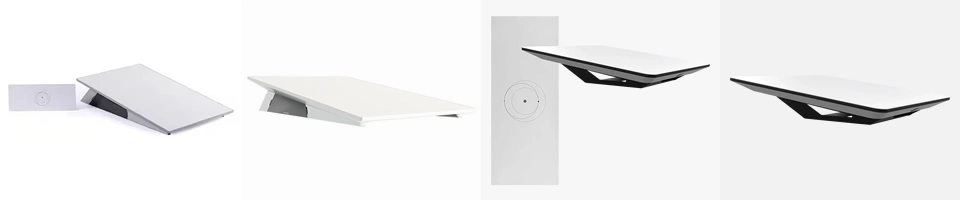
For new professional yacht installations, Marine Data Solutions recommends the Starlink Performance Kit (Gen 3).
The Performance Kit (Gen 3) is designed for demanding environments, permanent installation, high usage, and in-motion operation. These characteristics make it better suited to larger yachts and vessels that depend heavily on onboard internet.
Existing Flat High Performance Gen 2 systems do not automatically need to be replaced if they are operating properly. Whether an upgrade makes sense depends on the condition of the existing equipment, antenna placement, vessel usage, cruising profile, and performance requirements.
For a new yacht internet installation, the Performance Kit (Gen 3) is the current MDS recommendation.
Shop Starlink Performance Kit (Gen 3)
Why Gen 3 on water:
- Marine-oriented mounting (wedge/flat/pipe) and connector orientation designed to reduce water ingress.
- Operational resilience: designed for continuous duty, with improved thermal and environmental tolerances vs older kits.
Where and How Should the Starlink Performance Kit (Gen 3) Be Mounted on a Yacht?
The Starlink Performance Kit (Gen 3) should be installed on a rigid mounting surface with the clearest practical view of the sky. Antenna location should be evaluated in relation to radar arrays, satellite-TV domes, masts, superstructure, and other equipment that can obstruct the antenna’s field of view.
Proper mounting is not simply a matter of finding available space on the hardtop. The installation should also account for water drainage, cable routing, service access, structural support, corrosion protection, and separation from equipment that can create interference or obstruction.
Implementation notes:
- Maintain the clearest practical view of the sky and avoid obstruction from radar arrays, rigging, masts, domes, and large sections of superstructure.
- Use marine-grade fasteners, appropriate backplates, and corrosion control.
- Route Starlink cabling with appropriate drip loops, strain relief, and separation from radar and other high-power electrical cabling.
Shop Starlink Performance Kit (Gen 3)
Podcast:

Starlink Performance Kit (Gen 3) for New Yacht Installations
For new professional yacht installations, Marine Data Solutions recommends the Starlink Performance Kit (Gen 3). It is designed for demanding environments, permanent installation, in-motion operation, and higher-use applications commonly found on yachts.
Existing Flat High Performance Gen 2 systems do not automatically need to be replaced if they are performing properly. MDS can evaluate the existing installation and determine whether an upgrade is justified.
How Much Does Starlink Marine Cost?
Starlink Marine cost depends on the hardware selected, installation requirements, onboard network design, cruising area, and monthly airtime plan.
Marine Data Solutions maintains current Starlink airtime pricing separately so this technical installation guide does not contain duplicate pricing that can become outdated.
View Current MDS Starlink Airtime Plans & Pricing
For questions about Local vs. Global Priority, monthly data allowances, overages, and Starlink Limp Home Data, see the MDS Starlink Airtime and Priority FAQ.
What Happens When Starlink Priority Data Is Used Up?
What happens after the monthly Priority allowance is used depends on the MDS airtime plan and whether additional Priority data is enabled.
MDS Global Priority customers can either continue at full speed with additional Priority data at $2 per GB or opt out of overages and use Starlink Limp Home Data at up to 1 Mbps download and 0.5 Mbps upload until the monthly plan resets.
MDS Local Priority customers can add 50 GB top-ups when additional data is needed.
For complete airtime, overage, and Starlink Limp Home Data information, see the MDS Starlink Airtime and Priority FAQ.
What Speeds Should I Expect at Sea?
Starlink performance on a yacht varies by location, network demand, weather, antenna visibility, vessel movement, service plan, and onboard network configuration.
Speed tests alone do not tell the whole story. A Starlink system can show strong download speeds while still experiencing brief interruptions caused by antenna obstruction, heavy weather, or vessel movement.
Proper antenna placement and onboard network design are therefore just as important as peak speed.
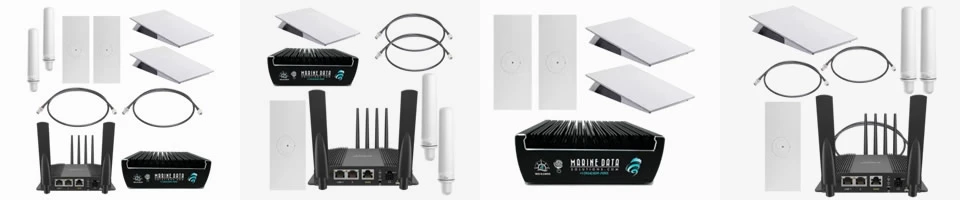
For larger yachts, the MDS Blender can combine Starlink with LTE/5G or other internet sources and apply traffic management, VLANs, and automatic failover to improve the onboard user experience.
Learn More About the MDS Blender
How Long Does Starlink Equipment Shipping Take?
Marine Data Solutions stocks Starlink and yacht internet equipment in Fort Lauderdale, subject to availability.
U.S. orders can typically be shipped by overnight service or standard ground delivery. For time-sensitive yacht projects, confirm current inventory and delivery timing with MDS before scheduling installation or commissioning work.
When possible, coordinate equipment delivery with the vessel’s yard period, electronics schedule, or installation window.

What Is the Best Way to Improve Starlink Reliability on a Yacht?
The most effective way to improve yacht internet reliability is to avoid depending on a single internet source.
A properly designed system can combine Starlink with LTE/5G, a second Starlink system, VSAT, Eutelsat OneWeb, or dockside WiFi through the MDS Blender.
When one WAN source becomes obstructed, congested, or unavailable, the Blender can shift traffic to the remaining working sources. This can reduce user-visible interruptions and help preserve active applications such as Zoom, Teams, VPNs, and remote desktops.
The exact combination should be based on vessel size, cruising area, number of users, internet usage, and the level of redundancy required by the owner or charter operation.
Typical reliability improvements include:
- Add a second internet source rather than relying on one Starlink terminal.
- Use LTE/5G near shore when coverage and performance are suitable.
- Consider a second Starlink system for larger or higher-demand yachts.
- Use the MDS Blender for WAN bonding, automatic failover, bandwidth management, and session preservation.
- Apply VLANs and traffic policies so operational traffic is protected from heavy guest streaming and downloads.
Learn More About the MDS Blender
What Are the Most Common Starlink Installation Mistakes on a Yacht?
The most common Starlink installation problems on yachts are poor antenna placement, obstruction from vessel equipment, inadequate mounting support, improper cable routing, and insufficient protection against water and corrosion.
A Starlink antenna can produce good speed-test results and still experience repeated brief interruptions if radar arrays, satellite-TV domes, masts, or superstructure block portions of its view of the sky.
Cable routing and mounting quality are also important. Starlink cabling should be properly supported, protected from water intrusion and mechanical damage, and separated where practical from radar and other high-power electrical systems.
Professional installation checklist:
- Select a mounting location with the clearest practical view of the sky.
- Evaluate obstruction from radar arrays, domes, masts, rigging, and superstructure.
- Use a rigid mounting surface with appropriate backing and marine-grade fasteners.
- Seal all penetrations and use appropriate corrosion protection.
- Route and secure cabling with drip loops, strain relief, and protection from mechanical damage.
- Maintain appropriate separation from radar and other high-power electrical cabling where practical.
- Verify Starlink operation and obstruction data after commissioning the system.
Shop Starlink Performance Kit (Gen 3)
How Do I Choose the Correct Starlink Mount for a Yacht?
The correct Starlink mount depends on the vessel structure, available mounting location, service access, cable route, and the amount of obstruction around the antenna.
For many hardtop and horizontal-surface installations, the Starlink wedge mount is a practical option for the Performance Kit (Gen 3). Pole, pedestal, or custom-fabricated mounts may be appropriate when the antenna must be raised to improve its view of the sky.
The mounting system should be rigid enough to prevent movement, properly supported by the vessel structure, and installed with marine-grade hardware and corrosion protection.
Typical mounting applications:
- Hardtop or radar arch: Performance Kit (Gen 3) wedge mount with appropriate backing and structural support.
- Mast or pedestal: Marine-grade pole adapter, pedestal, or properly engineered custom mount.
- Obstructed installation: Raise or relocate the antenna when practical to improve sky visibility.
- Temporary testing: A temporary non-penetrating mount may be used only after considering wind loading, vessel movement, and equipment security.
Shop Starlink Performance Kit (Gen 3)
What Generation of Starlink Do I Have?
The Starlink App can be used to identify the hardware installed on the vessel. Open the Starlink App and review the device or system information under Settings to identify the Starlink kit and associated hardware.
Model information can also be found on equipment labels, serial-number labels, original packaging, invoices, and installation records.
Correctly identifying the hardware is important before ordering replacement parts, mounts, cables, routers, or other Starlink components.
Why this matters:
Flat High Performance Gen 2 and the Starlink Performance Kit (Gen 3) use different hardware, cabling, mounting components, and installation requirements. Confirm the exact equipment before purchasing parts or planning an upgrade.
Shop Starlink Performance Kit (Gen 3)
Can I Use Starlink Between the U.S. and the Bahamas?
Yes, but the correct MDS Starlink airtime service depends on where the yacht is operating.
MDS Local Priority is intended for U.S. coastal and marina use. Yachts operating in the Bahamas, Caribbean, offshore, or internationally should use the appropriate Global Priority service.
For current plan selection, pricing, data allowances, and overage information, see the MDS Starlink Airtime and Priority FAQ.
How Can a Charter Yacht Manage Starlink Data Usage?
Charter yachts can reduce unnecessary data consumption by separating crew, operational, owner, and charter-guest traffic and applying appropriate bandwidth policies to each network.
The onboard network can also prioritize operational applications, voice, video conferencing, and vessel systems while managing high-bandwidth activities such as guest streaming, software updates, cloud backups, and large downloads.
LTE/5G can also be used when suitable nearshore coverage is available, reducing unnecessary use of Starlink Priority data.
Airtime-plan selection and current MDS Starlink pricing are covered separately in the MDS Starlink Airtime and Priority FAQ.
Typical data-management practices include:
- Separate operational, crew, owner, and charter-guest networks using VLANs.
- Apply per-device or per-network bandwidth limits where appropriate.
- Schedule large software and operating-system updates when lower-cost internet is available.
- Use LTE/5G near shore when coverage and performance are suitable.
- Monitor overall vessel data consumption through the onboard network.
At-a-Glance Tables
Starlink Performance Kit (Gen 3) Mounting Quick Reference
| Item | Guidance |
|---|---|
| Mounting surface | Use a rigid, structurally supported mounting location with marine-grade fasteners and appropriate backing. |
| Sky visibility | Select the location with the clearest practical view of the sky and minimize obstruction from radar arrays, domes, masts, rigging, and superstructure. |
| Water management | Install the mount and cabling so water cannot pool around connectors or penetrate cable-entry points. |
| Cabling | Provide proper support, drip loops, strain relief, and protection from mechanical damage. |
| Service access | Maintain reasonable access for inspection, troubleshooting, and future replacement. |
| Commissioning | Verify operation and review Starlink obstruction information after installation. |
Shop Starlink Performance Kit (Gen 3)
FAQ
⭐ Q1. What Starlink hardware does MDS recommend for a new yacht installation?
A: For new professional yacht installations, Marine Data Solutions recommends the Starlink Performance Kit (Gen 3). It is designed for demanding environments, permanent installation, in-motion operation, and higher-use applications typically found on larger yachts.
⭐ Q2. Where should the Starlink antenna be mounted on a yacht?
A: Install the antenna where it has the clearest practical view of the sky while maintaining structural support, service access, proper cable routing, and separation from equipment that can create obstruction. Radar arrays, satellite-TV domes, masts, rigging, and superstructure should all be considered when selecting the location.
⭐ Q3. Does an existing Flat High Performance Gen 2 system need to be replaced?
A: Not necessarily. An existing Gen 2 system that is operating properly may remain suitable for the vessel. An upgrade should be based on equipment condition, installation quality, cruising profile, performance requirements, and whether the newer Performance Kit (Gen 3) provides a meaningful benefit for that yacht.
⭐ Q4. What can cause Starlink interruptions on a yacht?
A: Common causes include antenna obstruction, vessel movement, heavy weather, network congestion, equipment issues, poor installation location, and onboard network problems. Even brief interruptions can affect Zoom, Teams, VPNs, remote desktops, and other applications that require continuous sessions.
⭐ Q5. Can two Starlink systems be installed on one yacht?
A: Yes. Larger or higher-demand yachts may use two Starlink systems to increase redundancy and reduce the impact of temporary antenna obstruction. Multiple Starlink systems can also be combined with LTE/5G and other WAN sources through the MDS Blender.
⭐ Q6. Can Starlink be combined with LTE/5G?
A: Yes. Starlink and LTE/5G can be integrated into the same yacht internet system. LTE/5G can be useful near shore when suitable cellular coverage is available, while Starlink provides satellite internet offshore. The MDS Blender can manage multiple WAN sources, automatic failover, bandwidth policies, and session preservation.
⭐ Q7. How long does MDS Starlink equipment shipping take?
A: Marine Data Solutions stocks Starlink and yacht internet equipment in Fort Lauderdale, subject to availability. U.S. orders can typically be shipped by overnight service or standard ground delivery. Confirm current inventory and delivery timing before scheduling a time-sensitive installation.
⭐ Q8. Where can I find current MDS Starlink airtime pricing?
A: Current Local Priority and Global Priority plans, monthly pricing, data allowances, activation fees, and support options are maintained on the MDS Starlink Airtime page. For questions about plan selection, overages, and Starlink Limp Home Data, see the MDS Starlink Airtime and Priority FAQ.
Key Takeaways
- For new professional yacht installations, Marine Data Solutions recommends the Starlink Performance Kit (Gen 3).
- Antenna placement is critical. Radar arrays, domes, masts, rigging, and superstructure can create temporary obstructions that affect Starlink performance.
- Use a rigid, properly supported marine installation with appropriate backing, corrosion protection, cable support, drip loops, and service access.
- Existing Flat High Performance Gen 2 systems do not automatically need to be replaced if they are operating properly. Upgrade decisions should be based on the vessel’s existing installation and performance requirements.
- Starlink can be combined with LTE/5G, a second Starlink system, VSAT, Eutelsat OneWeb, or dockside WiFi through the MDS Blender for additional redundancy and network management.
- For current MDS Starlink airtime plans, pricing, data allowances, overages, and Starlink Limp Home Data, use the MDS Starlink Airtime and Priority FAQ.
Conclusion
Starlink has become a primary internet source for many yachts, but reliable onboard internet depends on more than the satellite antenna alone.
Hardware selection, antenna placement, mounting, cable routing, onboard WiFi, network design, LTE/5G integration, and additional WAN sources all affect the experience seen by owners, crew, and charter guests.
For new professional yacht installations, Marine Data Solutions recommends the Starlink Performance Kit (Gen 3). Larger or higher-demand vessels can also combine multiple internet sources through the MDS Blender for additional bandwidth, redundancy, traffic management, and session preservation.
Starlink Hardware, Installation & Network Integration
Shop Starlink Performance Kit (Gen 3)
or
Contact Marine Data Solutions for Yacht Starlink Installation
Shop Starlink or Contact Us for More info